Every Instagram seller knows the pattern. You post a Reel, the comments start coming in, and you spend the evening typing “DM me” under each one.
Most of those people never send the DM. They wanted a price, they did not want to take an extra step, and by the time you replied they were watching something else.
What comment-to-DM does
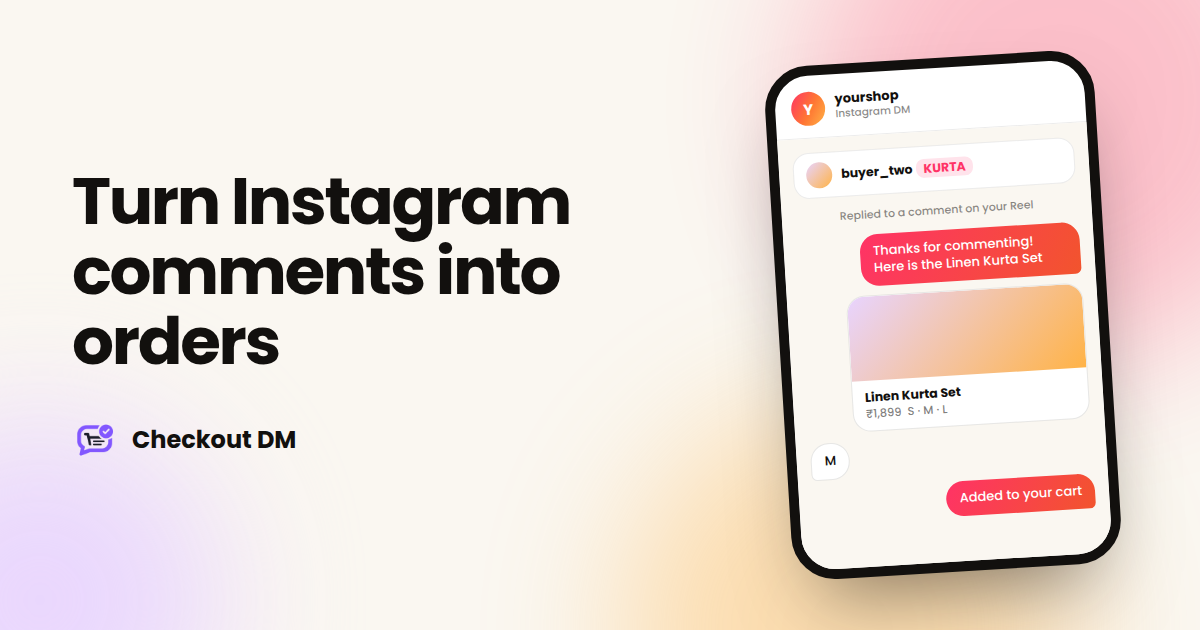
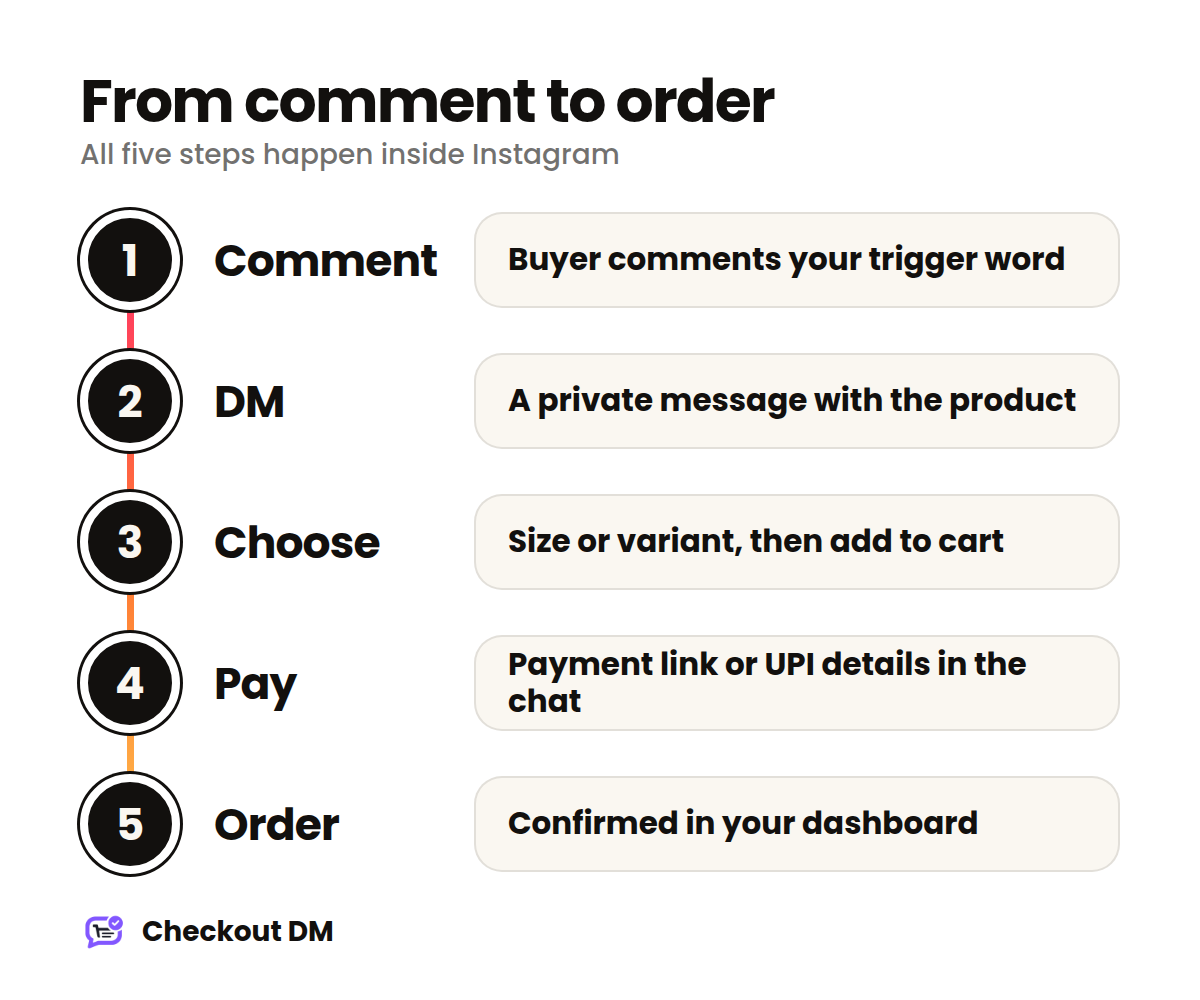
Comment-to-DM watches the comments on the posts or Reels you choose. When someone comments your trigger word, it sends them a private message automatically, with the product, the price, or the start of your checkout. The buyer stays inside Instagram and you do not type a thing.
yourshop
Instagram DM
Replied to a comment on your Reel
Hi! Thanks for commenting. Here is the Linen Kurta Set, ₹1,899. Which size would you like?
M
Added to your cart. Where should we deliver it?
Each person is messaged once per post, so a customer who comments twice does not get duplicate messages.
Why it works better than “DM me”
- No extra step for the buyer. They comment, and the conversation comes to them.
- Interest is caught while it is fresh. The reply arrives in seconds, not after your evening of replying.
- Every comment becomes a conversation you can track. You see who asked, what they chose and where they stopped.
How to set it up well
- Pick one clear trigger word. Short, easy to type and unlikely to appear by accident, like a product name or the word LINK.
- Tell people what to comment. Put it in the caption, on the screen in the Reel and in what you say out loud.
- Connect the comment to one product. A message about the exact item they saw converts better than a generic hello.
- Keep the first DM short. A greeting, the product, the price and one question.
- Test it first. Comment from a second Instagram account before you post publicly.
Comment-to-DM is available from the Creator plan onward. You can compare plans on the pricing page.
Mistakes to avoid
- A vague trigger word. Common words like “yes” or “price” get commented for all kinds of reasons and will fire at the wrong moments.
- A wall of text in the first message. People should be able to answer in one tap.
- Promoting something that is sold out. Keep your stock up to date so customers are never excited about a product you cannot sell.
- Setting it and forgetting it. Check your Automations tab to see how many messages each rule has sent, and adjust the wording if replies are low.
A step-by-step setup walkthrough
The setup is quick once your catalog is ready. Here is the order that works best, whichever tool you use.
- Choose the post or Reel. Pick one that already shows a specific product. A comment trigger works best when the post is about one item, because the DM can then talk about exactly that item.
- Pick the trigger word. Use one short word that people can type easily and that is unlikely to appear by accident. A product name, a collection name or the word LINK all work.
- Write the first message. Greet the person, name the product, give the price and ask one simple question, such as which size they would like. Keep it to two or three short lines.
- Connect it to the product. Make sure the message points to the right item in your catalog so the next step, choosing a size and adding to the cart, is one tap away.
- Test it from a second account. Comment the trigger word and read the reply the way a customer would. Check the tone, the price and what happens when you answer.
- Go live and watch the first day. Look at the first few real conversations and fix anything that confuses people before you promote the post harder.
Captions and Reels that get people to comment
A comment trigger only works if people know what to do. The instruction needs to be clear, specific and easy to follow from a quick glance at the post.
- Say what they get. “Comment KURTA and I will send you the price and sizes” tells people exactly what to expect. “Comment below” does not.
- Repeat the instruction. Put it in the caption, show it as text on the screen in the Reel, and say it aloud. People watch with the sound off, and they skim captions.
- Make the keyword match the product. If the Reel shows a kurta set, the word should be easy to connect to it.
- Keep one call to action per post. A post that asks for a comment, a follow, a share and a save gets fewer of every one.
- Reply to other comments too. Comments that are not the trigger word still deserve an answer, and a mix of replies keeps the thread looking human.
How to tell whether it is working
Do not judge a comment-to-DM setup by the number of comments alone. What matters is how many of those comments turn into conversations, and how many conversations turn into orders. Look at four things each week:
- Messages sent by each rule. Your Automations tab shows how many messages each rule has sent, which tells you how many people actually used the trigger.
- Conversations that continue. If many people receive the message but few reply, the first message is probably too long or too vague.
- Orders that follow. Compare the orders from that post with a post that used no automation.
- Where people stop. If they choose a size and then go quiet, look at the next step, not the first one.
Change one thing at a time. If you rewrite the message, the trigger word and the caption at once, you will not know which change made the difference.
Comment-to-DM and Instagram’s rules
A well-built comment-to-DM tool works through Instagram’s official platform, and the conversation starts because the customer commented. That is what keeps it on the right side of the rules. A few habits keep you there too:
- Use it for people who have actually asked, not to message strangers.
- Keep your messages relevant to the post that prompted them.
- Avoid trigger words that invite spam or unrelated comments.
- Choose a tool that connects through Instagram’s official login. See Is Checkout DM Safe? for what to check.
Comment-to-DM is one of three ways to start a sale on Instagram. For the full picture of how it fits with Story replies and direct messages, read How to Automate Sales on Instagram.
Related reading
Frequently asked questions
Does comment-to-DM work on Reels?
Yes. Checkout DM supports comment-to-DM on your posts and Reels, so a comment can start a private conversation with the buyer.
Which plans include comment-to-DM?
Comment-to-DM is available from the Creator plan onward, including Starter, Growth and Pro.
Will someone get the same message twice if they comment again?
No. Each person is messaged once per post, so repeat comments on the same post do not trigger duplicate messages.