Someone watching your Story is already looking at your product. If they reply, they have raised their hand.
Yet most Story replies get lost. They land in a busy inbox between other chats, the answer comes hours later, and by then the Story has expired and the moment has passed.
Why Story replies convert
- The buyer is looking at the product right now. There is no need to remind them what you sell.
- They started the conversation. A reply is a request, not a cold message.
- It is private and low pressure. A DM feels easier than a public comment for showing interest in a product.
Design a Story that invites a reply
- One clear product per keyword. One clear image and one price for each product. A Story with six products gets zero replies. If you want to show two products, keep them clearly separate and give each its own keyword.
- Show the price on screen. It saves a question and filters out people who are not ready to buy.
- Tell people exactly which word to send. “Reply RED for the red one” is easier to act on than “DM to order.”
- Use real urgency only. Limited stock or a real end date works. Fake countdowns damage trust.
- Show the product in use. A person wearing or using it sells better than a flat catalog photo.
How a Story reply becomes an order
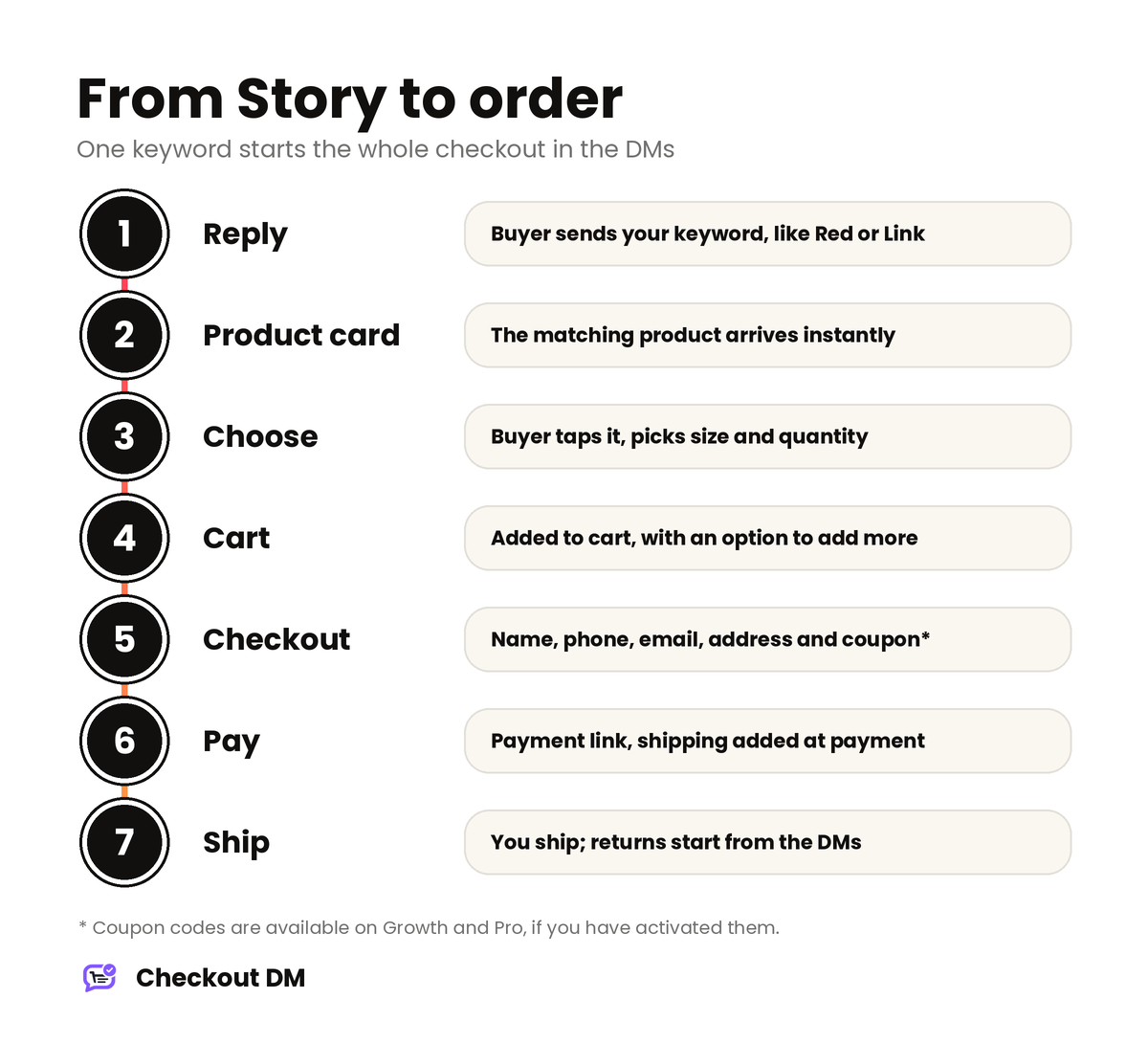
A Story lasts 24 hours, so speed matters. With Story Automation, the buyer does not wait for you to wake up or open your inbox. One word sent on your Story starts the whole journey, and every step happens in the same chat.
- The buyer replies with a keyword. It can be a colour like Red or Blue, or a word like Link or Product, or anything else you set in the Story Automation panel inside your Merchant Dashboard.
- The product card arrives instantly. Whatever keyword you set, the buyer always receives the same product you attached to it.
- The buyer opens the product. They tap the card and follow the on-screen instructions to choose details like size and quantity. Buyers never have to type their size on your Story.
- The item goes into the cart. The buyer is then asked if they would like to add more to the same cart.
- Checkout. The buyer enters their name, phone number, email ID and billing address. If you are on the Growth or Pro plan and have activated coupons, they can also enter a coupon code here.
- Payment. The buyer pays through a payment link. The shipping amount is added on the payment screen according to the shipping conditions you have already set.
- Shipping and after-sales. Once the order is confirmed, you ship it. If you allow returns or exchanges and the buyer needs one, the request can be started right from the DMs.
yourshop
Instagram DM
Replied to your Story
Blue
[Product card] Blue Linen Kurta Set · ₹1,899 · Select this
Select this
Which size and how many would you like?
M, 1
Added to your cart. Would you like to add anything else before checkout?
Two keywords, two products on one Story
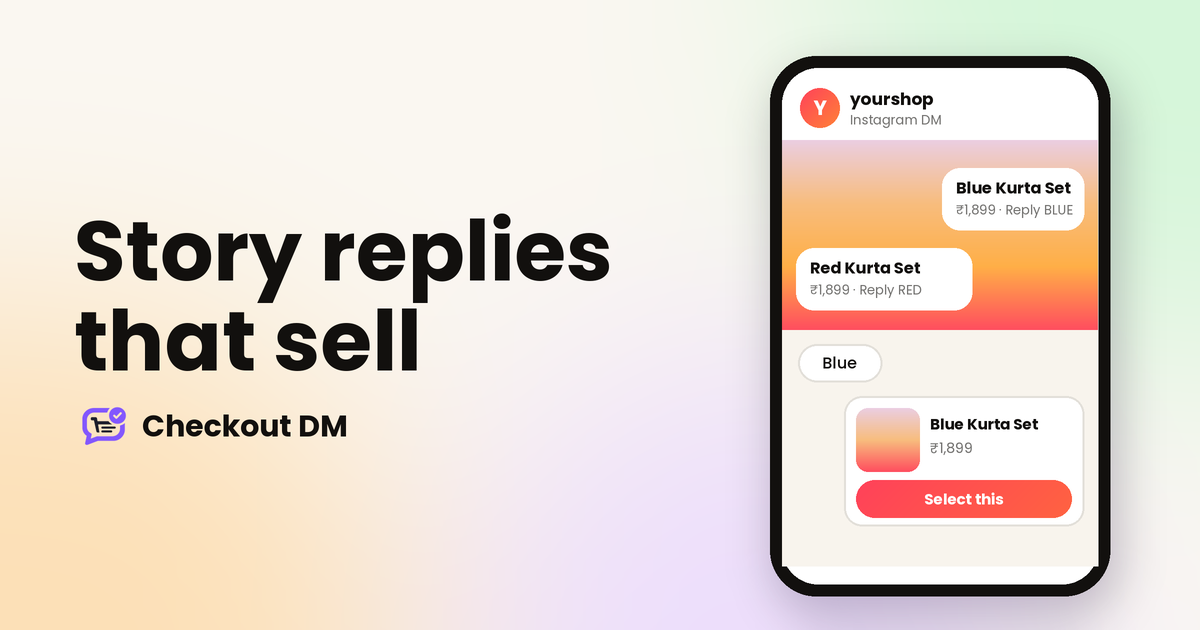
A single Story can carry up to two keywords and two different products. For example, a Story showing a red and a blue lipstick can use Red for the first product and Blue for the second. A buyer who replies Red gets the red product card, and a buyer who replies Blue gets the blue one. Each keyword always sends its own product, so there is no confusion about what the buyer meant.
The automation tied to a Story switches itself off shortly after the Story expires, so customers are never pointed at something you are no longer showing.
A simple weekly Story rhythm
- Monday: one new arrival with its price and a clear keyword to reply with.
- Wednesday: a behind-the-scenes or in-use shot of a best seller.
- Friday: the last few pieces of something selling fast, with honest stock numbers.
Mistakes to avoid
- Crowding a Story with products. Each Story supports two keywords and two products. Beyond that, buyers cannot tell what to send.
- No keyword on screen. If buyers do not know which word to reply with, most will simply swipe away.
- No price anywhere. People hesitate to ask, and quietly swipe away.
- Ignoring replies that are not about the product. If a customer wants a human, reply yourself. When you reply to a conversation, the bot steps back so you can take over.
Story formats that work for selling
Not every Story needs to be a sales pitch. The Stories that sell tend to give people a reason to care about the product first. A few formats are worth repeating:
- Product spotlight. One item, one clear photo, the price on the screen and a simple instruction to reply with your keyword.
- In use. Someone wearing, holding or using the product, which answers questions that a flat photo cannot.
- Behind the scenes. Packing an order, cutting fabric or unboxing new stock. It builds trust and makes the shop feel real.
- Customer photos. A customer wearing what they bought, shared with their permission, is the most convincing proof you can show.
- Last few pieces. An honest stock update such as “Just three left in M”. Only use this when it is true.
Choosing your keyword
The keyword is the only thing the buyer has to type on your Story, so make it easy. Pick a short word that is simple to spell on a phone and obvious from the Story itself. A colour, the word Link or the word Product all work well. You can use any word you like, as long as it is clear what it will send. Compare these two:
| Hard to act on | Easy to act on |
|---|---|
| DM us to know more about this product. | Reply RED to get the red one. |
| Message us with your requirements. | Reply LINK and the product comes straight to your DMs. |
The easier it is to reply, the more replies you get. The buyer does the minimum, and the product card does the rest of the work.
What if a buyer sends a word that is not one of your keywords? They may or may not get a reply, and it depends on your own setting. If you have chosen the option where any reply to the Story triggers the automation, every reply gets the product card. If not, only your exact keywords do, so make the keyword very clear on the Story.
Replies that are not about the product
Story replies are not only buying requests. People send emoji, compliments, questions about delivery and sometimes something unrelated. Plan for this so your automation does not feel clumsy.
- Compliments and emoji. A short, friendly thank you is enough. They do not need a catalog.
- Questions you can answer. Delivery time, return policy and payment options are worth having ready as short answers.
- Requests for something custom. Take these over yourself. When you reply to a conversation, the bot steps back so you can talk to the customer directly.
- Messages that need care. A complaint or a problem with an order deserves a real person, quickly.
How to measure your Story results
Stories disappear after a day, so it is easy to forget to measure them. A short weekly review is enough. Count how many Story replies you received, how many turned into carts and how many into paid orders. If many people reply but few reach the cart, the product on the card or its price may not match what the Story promised. If they reach the cart and stop, look at the checkout steps and the shipping amount shown at payment.
Compare Stories with one keyword against Stories with two, and Stories that stated the price with those that did not. Over a few weeks you will see a pattern, and you can repeat what works. For the bigger picture of how Story replies fit alongside comments and direct messages, see How to Automate Sales on Instagram.
Related reading
Frequently asked questions
What does a buyer send on my Story?
A single keyword, such as Red, Blue, Link or Product, or any word you set in the Story Automation panel of your Merchant Dashboard. Buyers never have to message their size on the Story. The size and quantity are chosen after they open the product card.
Can one Story sell two products?
Yes. A single Story can have two keywords and two different products. Each keyword sends its own product card to the buyer.
What if the buyer sends a word that is not my keyword?
It depends on your setting. If you have turned on the option where any reply to the Story triggers the automation, the buyer gets the product card whatever they send. Otherwise, only your keywords trigger a reply, so the buyer may not get one.
What happens after the buyer sends the keyword?
They receive the product card, open it and choose details like size and quantity, and the item is added to their cart. They can add more to the same cart, then check out with their name, phone number, email ID and billing address, and pay through a payment link. Shipping is added on the payment screen as per your settings.
Can buyers use a coupon code?
Yes, if you are on the Growth or Pro plan and have activated coupons. The buyer enters the code during checkout, before the payment step.
Who handles shipping, returns and exchanges?
You ship the order once it is confirmed. If you allow returns or exchanges, the buyer can start a request from the DMs.
Do Story replies work on every plan?
Yes, Story replies are handled on every plan. On Free, Creator and Starter the response is general, and on Growth and Pro each keyword sends the specific product you attached to it.
How long does a Story automation stay active?
It is tied to the Story and switches itself off shortly after the Story expires.
Can I reply to a customer myself?
Yes. If you reply to a customer yourself, the bot steps back so you can take over the conversation.